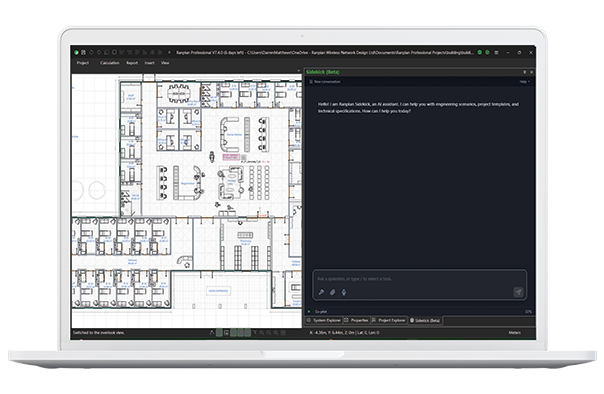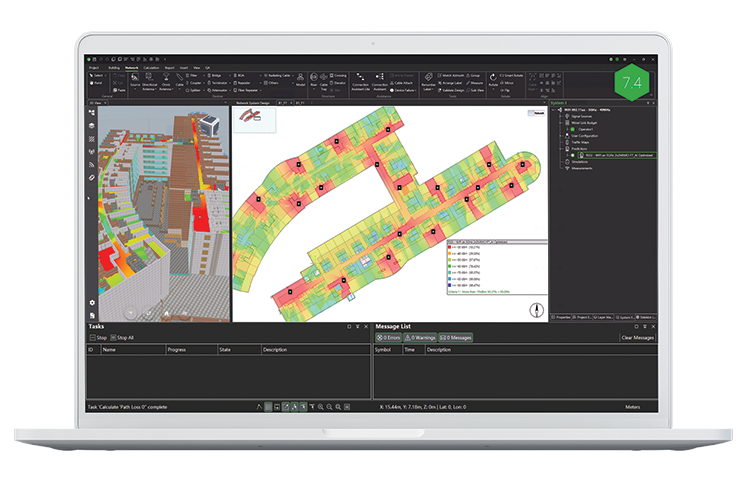
Ranplan Sidekick is an AI assistant within Ranplan’s wireless network planning software. It helps you prepare building and outdoor models, edit network designs, run predictions and explore results using plain-language requests. Describe what you want to achieve, review the proposed action and let Sidekick carry out supported tasks in Ranplan.
AI-Assisted Model Preparation
Generate 3D building models and source outdoor GIS data using plain-language requests.
Automated Design Workflows
Reduce repetitive network editing and simplify everyday project tasks.
KPI-Driven Optimization
Evaluate network performance and optimise new network designs against your defined coverage or SINR targets.
Engineer-Led Control
Review and approve proposed actions while retaining control of your design.
Features
MODELLING AUTOMATION
Prepare Building Models and Source GIS
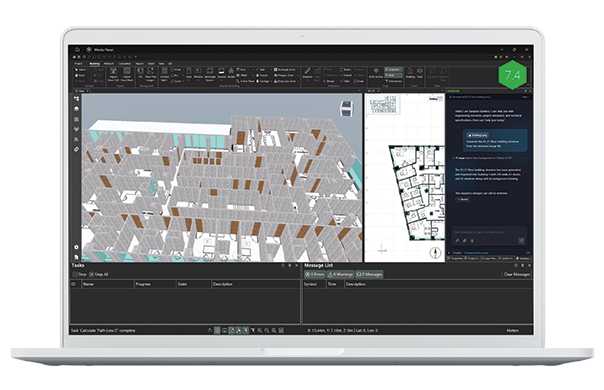
Sidekick reduces model preparation work by helping you build 3D models from PDF, image and DXF floor plans, recognising walls, doors and windows and aligning floors. For outdoor planning in Professional, it can source and import GIS data covering buildings, foliage and terrain for your chosen area.
Sidekick can also convert supported iBwave exports into IFC building models ready for import into Ranplan.
SIMPLIFIED DESIGN
Automate Everyday Design Workflows
Describe the changes you need and let Sidekick help carry them out across your project. Update antennas, copy network layouts between floors, and make repeated changes without editing each object individually. Save and reuse supported tasks to simplify recurring workflows across projects.
Sidekick also helps prepare drawings, export bills of materials, and populate presentation templates, reducing the work involved in communicating and handing over your design.
Ask Sidekick questions about Ranplan's features or your current project, from software guidance to information about network components, quantities and configurations.
PREDICTIONS
Evaluate Predictions and Optimize Network Designs
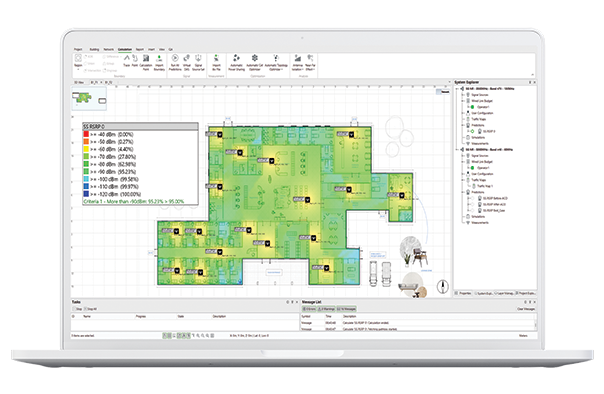
Ask Sidekick to run predictions and evaluate how well your network design performs against your defined requirements.
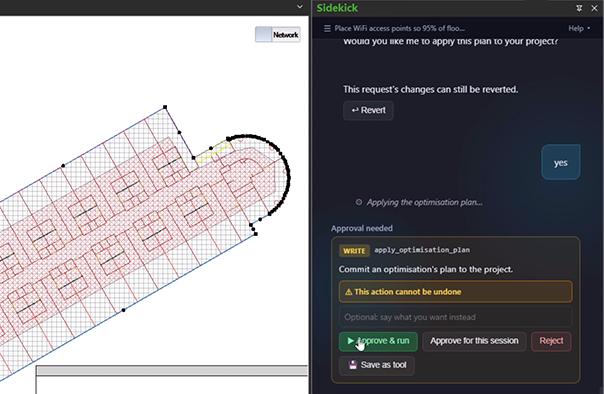
For new deployments, set your coverage or SINR targets and let Sidekick optimise transmitter placements from the ground up, exploring and comparing different network configurations to help you identify an effective design.
CONTROL
Keep Control of Your Design
Sidekick presents proposed project changes for approval, giving you the opportunity to review and refine its approach before proceeding. Check the results, adjust your request and decide which changes to apply—keeping your engineering judgement at the centre of the design process.
Sidekick Prompts
What could you ask Sidekick?
“Build the building from these floor plans.”
“Prepare the outdoor environment around this site.”
“Optimise transmitter placement to meet my coverage targets.”
Start with your planning goal. Sidekick asks for additional information where needed and guides you through the supported workflow.
FAQs
Frequently Asked Questions
What drawings and data can Sidekick work with?
Sidekick can work with PDF, image and DXF floor plans to help prepare building models. In Professional, it can also source and import outdoor GIS data. It can convert iBwave exports into IFC building models for subsequent import into Ranplan.
Can Sidekick work with existing network designs?
Yes. Sidekick can help modify existing projects, update network components, copy layouts and run predictions. Its automated transmitter placement optimisation currently focuses on new deployments.
Can Sidekick help optimise a network design?
Yes. For new deployments, you can define coverage or SINR targets and let Sidekick run the optimisation, propose transmitter placements and compare network configurations. This helps you assess predicted performance and equipment requirements before selecting a design.
Can Sidekick answer questions about my current project?
Yes. Sidekick can help you explore information within your open project, including network components, quantities and configurations. It can also answer questions using Ranplan's official user guidance.
Can Sidekick generate reports and project deliverables?
Sidekick can help prepare drawings, export bills of materials and populate presentation templates, reducing the manual work involved in documenting and sharing network designs.
Does Sidekick make changes automatically?
Sidekick presents supported project changes for review and approval before applying them. You can refine your instructions and review the results, maintaining control over your network design.
How does Ranplan Sidekick handle my project data?
Sidekick processes relevant project information to understand your requests and carry out supported tasks. Data handling, storage and access are governed by Ranplan's privacy policy.
Who can use Ranplan Sidekick?
Sidekick is available in beta with Ranplan 7.4 for Professional and In-Building users with valid Annual Maintenance and Support. A Ranplan Cloud sign-in and Sidekick access enabled on your account are required.
Explore Sidekick and spend less time on repetitive planning tasks and more time on engineering decisions